How to Create a Content Calendar is the biggest task, Creating random content may give short-term visibility, but consistent growth comes from structured planning. A content calendar helps you organize ideas, maintain publishing consistency, align marketing goals, and increase traffic strategically.
Whether you are a blogger, digital marketer, business owner, or content creator, learning how to create a content calendar is one of the most powerful systems you can build.
This detailed guide will walk you through every step.
What is a Content Calendar?
A content calendar is a planning system where you schedule and organize:
- Blog posts
- Social media posts
- Email campaigns
- Videos
- Promotions
- Seasonal content
It gives you clarity on what to publish, when to publish, and where to publish.
Instead of asking “What should I post today?”, you already have a structured roadmap.
Why You Need a Content Calendar
Before jumping into the process, understand its benefits.
✅ 1. Consistency
Publishing regularly improves SEO and audience trust.
✅ 2. Strategic Planning
You can align content with product launches, events, or campaigns.
✅ 3. Better SEO Performance
Planning allows keyword clustering and topical authority building.
✅ 4. Saves Time
Batch creation reduces last-minute stress.
✅ 5. Performance Tracking
You can track which content types perform best.
Step-by-Step Guide: How to Create a Content Calendar
Step 1: Define Your Content Goals
Start with clarity.
Ask yourself:
- Do I want traffic?
- Leads?
- Brand awareness?
- Sales?
- Authority building?
Your calendar must reflect your objective.
Example Goal Mapping
| Goal | Content Type |
|---|---|
| Traffic | SEO blog posts |
| Leads | Case studies, lead magnets |
| Sales | Product tutorials |
| Authority | In-depth guides |
Without clear goals, your content calendar becomes random.
Step 2: Identify Your Target Audience
Understanding your audience helps you create relevant content.
Ask:
- Who are they?
- What problems do they face?
- What questions do they search for?
- What platforms do they use?
Create a Simple Audience Profile
- Age group
- Industry
- Pain points
- Goals
- Common search queries
This step ensures your content resonates.
Step 3: Perform Keyword & Topic Research
This is where SEO meets planning.
Use tools like:
- Google Search
- Google Trends
- Search Console
- Ubersuggest
- AnswerThePublic
Look for:
- Informational queries
- Low competition keywords
- Long-tail keywords
- Trending topics
Organize Topics in Categories
For example (Digital Marketing):
- SEO
- Content Marketing
- Google Ads
- Social Media
- Case Studies
This creates topical authority.
Step 4: Decide Content Types
A strong content calendar includes variety.
Common Content Formats:
- Blog posts
- Tutorials
- Case studies
- Infographics
- Reels / Short videos
- Email newsletters
- Podcast summaries
Diversifying formats keeps engagement high.
Step 5: Choose Publishing Frequency
Be realistic.
If you are solo:
- 2 blog posts per week
- 3–4 social posts weekly
If you have a team:
- Daily content possible
Consistency matters more than volume.
Step 6: Select the Right Tool
You don’t need expensive tools initially.
Simple Tools for Content Calendar:
| Tool | Best For |
|---|---|
| Google Sheets | Beginners |
| Notion | Organized planning |
| Trello | Visual board |
| Asana | Team collaboration |
| ClickUp | Advanced workflow |
Start simple. Upgrade later.
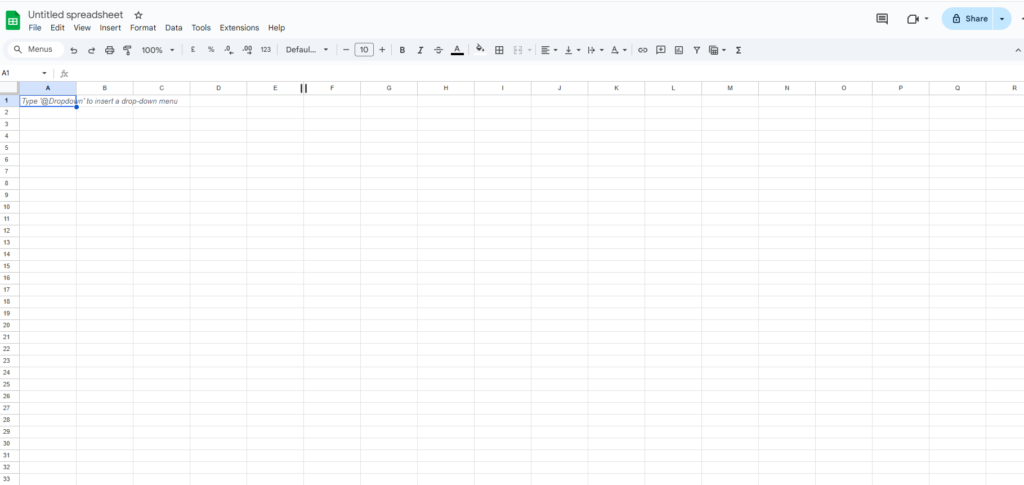
Step 7: Create Calendar Structure
Your calendar should include:
- Content Title
- Target Keyword
- Format
- Platform
- Publish Date
- Status
- Performance Metrics
Sample Content Calendar Structure
| Date | Topic | Keyword | Format | Status |
|---|---|---|---|---|
| Feb 10 | SEO Guide | On-page SEO | Blog on Digital Marketing News & Updates 2026 | Published |
| Feb 14 | Meta Ads Tips | Reduce CPL | Blog | Draft |
This clarity prevents confusion.
Step 8: Plan Monthly Themes
Planning by theme improves strategy.
Example:
Week 1: SEO
Week 2: Content Marketing
Week 3: Ads
Week 4: Case Studies
Themes create topical depth.
Step 9: Add Distribution Plan
Publishing is only 30% work.
Add a column for:
- Medium
- Quora
- Email list
Each blog should be repurposed.
Step 10: Track Performance & Optimize
Every month review:
- Impressions
- Clicks
- CTR
- Conversions
- Engagement
Update low-performing content. like how do i rank without backlink
Content calendar is not static — it evolves.
Common Mistakes to Avoid
- ❌ Posting without keyword research
- ❌ Planning too many posts initially
- ❌ Ignoring analytics
- ❌ No repurposing strategy
- ❌ Not updating old content
Avoiding these improves long-term growth.
Example Monthly Content Plan (Beginner Friendly)
Week 1
- Blog: SEO Basics Guide
- Pinterest Pin
- LinkedIn Post
Week 2
- Blog: Content Marketing Strategy
- Medium republish
- Email newsletter
Week 3
- Blog: Google Ads Tutorial
- Case study
- Short video summary
Week 4
- Blog: Traffic Growth Experiment
- Social promotion
- Analytics review
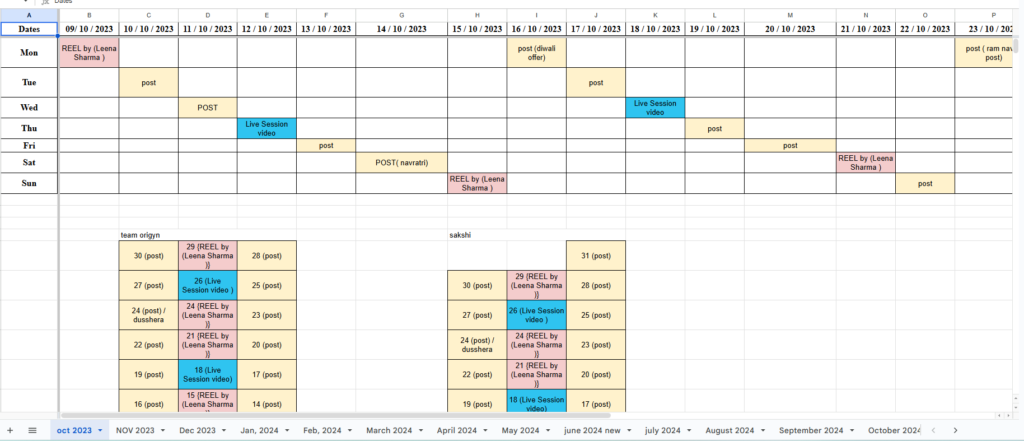
How to make a social media calendar?
I am showing one of my social media calendar ss for my client you can review and how can I grow instagram followers you can check also
How Content Calendar Improves SEO
- Builds topical authority
- Encourages internal linking
- Improves crawl frequency
- Increases consistency signals
- Helps keyword clustering
Search engines prefer structured publishing patterns.
FAQ Section
Ideally 1 month ahead. Advanced marketers plan 3 months in advance
Yes. It should be flexible based on performance and trends.
2–3 high-quality posts are better than 7 low-quality posts.
Yes. Integrated planning improves efficiency.
No. Google Sheets is enough to start.
Final Thoughts
Creating a content calendar is not just about scheduling posts. It’s about building a structured system that supports long-term growth, SEO performance, audience engagement, and brand authority.
If you want consistent traffic, better rankings, and strategic clarity, building a content calendar is your first step.
If you want a ready-to-use content calendar template or personalized strategy for your niche, start implementing this framework today and plan your next 30 days of content in advance.
Consistency builds authority. Strategy builds growth.